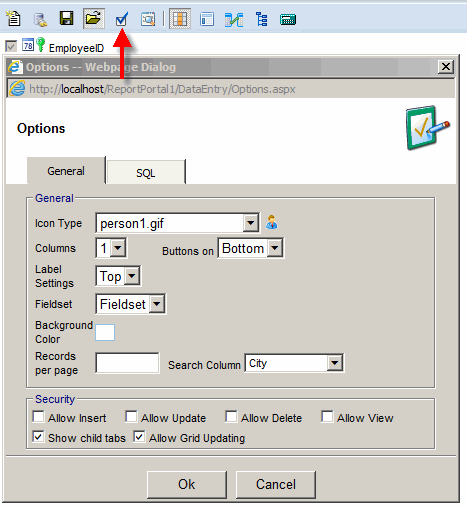
Options
Options provides:
- Icon - image used in the navigation tree.
- Columns - when a control is not added to any layout panel it will be placed at the bottom
of the form and organized into the number of columns specified here. This value is also used as the
default number of columns used by layout panel.
- Buttons on - specifies the location of "Update, Insert and Delete" button: Bottom, Top or Both.
- Label Settings - specifies the location of the label in relation to a control: Top or Left.
- Fieldset:
- None - no border is visible around the panel.
- Fieldset - light border is visible around the panel.
- Horizontal line - a straight line separates panels.
- Box - solid rectangle around the panel
- Background Color - background color of the form.
- Records per page - when left blank 100 records per page are used.
- Search Column - default search column
- Security options
- Allow Insert - this option will allow adding new records
- Allow Update - this option will allow updating existing records
- Allow Delete - this option will allow record deleting
- Allow View - when this option is unchecked and "Allow Insert" is checked,
user will only be able to add records
- Show child tabs - shows/hides tabs at the bottom of the form
- Allow Grid Updating - when this option is check the data grid can be updated.
Each updated column needs to have "Update in Grid" option checked.
- SQL - can be used to sort and filter records used in the navigation tree and the data grid.
It is possible to have a security based on User / Windows User information.
Following security tokens can be used:
- ::UserId - ReportPortal User ID
- ::UserName - ReportPortal User Name
- ::NtUserId - Windows User ID
- ::Email - Email